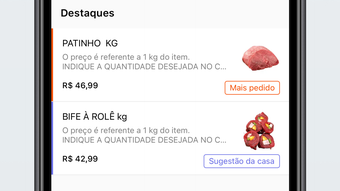

Order Meat with Ease on Any PC
The Açougue HTM desktop application streamlines the process of ordering meat from a local butcher shop, offering a seamless digital experience for users who value convenience and quality. Designed for individuals and households seeking efficient grocery solutions, the software enables quick and reliable meat ordering directly from a desktop environment. It caters particularly to those who frequently purchase meat for meals, barbecues, or family dinners, allowing them to plan and manage orders without visiting the store in person.
The app supports scheduling, real-time order tracking, and instant reordering, making it ideal for regular customers looking to save time and maintain consistency in their purchases. Users can also access their order history and receive promotional offers, enhancing the overall shopping experience. The developer, Açougue HTM, has focused on creating a user-centric tool that bridges the gap between traditional butcher shops and modern digital habits.
While specific details about the developer’s background are not provided, the application’s purpose is clear: to bring the butcher shop experience directly to the user’s desktop. This software is especially useful for home cooks, meal planners, and busy professionals who want a reliable, efficient way to manage their meat procurement.
Key Features & Capabilities
- Scheduled Ordering – Users can pre-schedule meat orders for specific dates, ensuring fresh cuts are delivered on time for events like weekend barbecues or family gatherings.
- Real-Time Order Tracking – The app provides live updates on order status, allowing users to monitor progress from preparation to delivery without needing to contact the shop.
- One-Touch Reordering – Frequently purchased items can be reordered instantly, reducing the time and effort required for repeat purchases.
- Order History Access – A comprehensive record of past orders is maintained, helping users track their preferences and spending patterns over time.
- Promotions and Discounts – Customers who sign up receive exclusive coupons and promotional offers, adding value to their regular purchases.
These features are designed to support consistent, stress-free meat procurement. For example, a user preparing for a summer cookout can schedule their order weeks in advance, receive notifications when the meat is ready, and reorder the same cuts later with minimal effort. The integration of order history also helps users identify their most popular products, enabling smarter shopping decisions.
The app’s focus on convenience and efficiency aligns with modern consumer expectations for digital tools that simplify daily tasks. While the software does not include advanced analytics or inventory management, its core functionality remains highly practical for its intended audience. The features are implemented with usability in mind, ensuring that users can complete their tasks without unnecessary complexity.
User Interface, Workflow & Performance
The user interface of Açougue HTM is designed with simplicity and clarity in mind, featuring a clean layout that prioritizes accessibility across different user skill levels. Navigation is intuitive, with key functions such as placing an order, viewing order history, and managing account settings clearly labeled and easy to locate. The workflow follows a logical sequence: users select their desired meat cuts, adjust quantities, schedule delivery, and confirm the order—all within a few clicks.
This streamlined process reduces friction and supports quick decision-making. The app maintains a responsive interface, ensuring smooth interactions during order placement and data retrieval. Performance details were not specified by the developer, but based on the application’s size (25.4 MB), it is likely optimized for efficient operation on standard desktop systems.
The developer did not provide information on CPU or RAM usage, so resource behavior remains unknown. Stability during extended use is not documented, though the lightweight footprint suggests minimal strain on system resources. Overall, the app appears designed for consistent, reliable performance in everyday use, with a focus on usability rather than high-end system demands.
Compatibility & System Requirements
Açougue HTM is available for both Windows and Mac operating systems, making it accessible to a broad user base across desktop platforms. The software version is 1.0.0, indicating a stable initial release. The installation size is 25.4 MB, which is compact and suitable for systems with limited storage space.
The developer did not specify exact system requirements, including minimum processor speed, RAM, or disk space beyond the installation size. As such, compatibility with older or lower-end systems cannot be confirmed. Platform compatibility information is limited, though the availability on both major desktop operating systems suggests broad support.
Users are advised to ensure their system meets general desktop software requirements for optimal performance. The absence of detailed technical specifications means that potential users should proceed with caution if using legacy hardware or restricted environments. For users on modern Windows or Mac systems, the app is expected to function without issues, but definitive compatibility testing is not possible without further details.
Pros and Cons
Pros
- Lightweight installation at just 25.4 MB
- Available for both Windows and Mac users
- Intuitive interface designed for quick navigation
- Supports scheduled and one-touch reordering
- Offers real-time order tracking and history access
- Free to download and use
Cons
- Exact system requirements were not listed
- Performance metrics such as CPU and RAM usage are unknown
- No information on offline functionality
- Developer background and company details are not provided
- Update frequency and support timeline are unclear
FAQ Section
Is Açougue HTM compatible with my desktop?
The software is available for Windows and Mac operating systems. While specific hardware requirements were not provided, the compact installation size suggests compatibility with most modern desktop systems. Users with older or low-spec machines should verify system compatibility before installation.
Is the app safe to use?
Açougue HTM is a free desktop application designed for meat ordering. It does not require sensitive permissions beyond standard data access for order processing. As with any software, users should download it from official sources to ensure security and integrity.
How often does the app receive updates?
The update schedule for Açougue HTM has not been disclosed by the developer. Users are encouraged to check the official source regularly for the latest version and new features.
Can I use Açougue HTM without an internet connection?
Information about offline functionality was not provided. The app’s features, such as real-time tracking and scheduling, suggest it requires an active internet connection for full operation.
What type of license does Açougue HTM use?
The software is available at no cost and does not require a license key for installation or use. The developer has not specified the exact license type, but it is intended for personal and non-commercial use.
Final Thoughts + CTA
Açougue HTM delivers a focused and practical solution for users seeking a convenient way to order meat from their local butcher shop directly from their desktop. With its clean interface, real-time tracking, and one-touch reordering, the app simplifies a routine task and enhances the overall shopping experience. The fact that it is free and available on both Windows and Mac platforms increases its accessibility.
While the lack of detailed system requirements and performance data limits deeper evaluation, the app’s lightweight nature and core functionality make it a reliable choice for regular customers. It is particularly well-suited for home cooks, meal planners, and families who value efficiency and consistency. For those looking to digitize their meat procurement process without complexity, Açougue HTM offers a smart, user-friendly alternative.
Download Açougue HTM now.







